
In the digital transformation era, efficient paper document management is crucial for maintaining corporate operational agility. Many organizations still spend thousands of labor hours manually entering data from receipts, tax invoices, application forms, and identity cards into enterprise computer systems.
Manual data entry is not only time consuming, but also highly prone to human error. To solve these operational bottlenecks, modern organizations leverage digital image processing technology known as OCR.
What Is OCR?
OCR stands for Optical Character Recognition, a technology that converts images of printed text, handwritten notes, or scanned documents into editable, searchable, and machine readable digital text data.
Through what is ocr technology, physical paper documents such as vendor invoices, utility bills, or national identity cards can be quickly converted into structured digital datasets. This data can then be seamlessly ingested into enterprise databases, ERP systems, or financial applications without manual retyping.
OCR is an artificial intelligence and image processing technology that recognizes and extracts text characters from scanned document images, converting them into machine readable structured data.
Why Is OCR Technology Vital for Modern Enterprises?
The rapid accumulation of paper and PDF documents across enterprise operations often outpaces workforce capacity. Relying on manual data entry introduces several critical operational drawbacks:
High Operational Expenses: Allocating skilled employees to repetitive data entry tasks inflates operational overhead.
Slow Processing Speeds: Manual document verification takes days, creating friction in customer onboarding and financial reporting.
Risk of Data Entry Errors: Manual accuracy degrades as workload volumes increase and fatigue sets in.
Physical Storage Overhead: Archiving paper documents requires physical space, making retrieval slow during audits.
How OCR Works: The Document Extraction Pipeline
Understanding how ocr works involves looking at a multi-step digital image processing and pattern recognition pipeline:
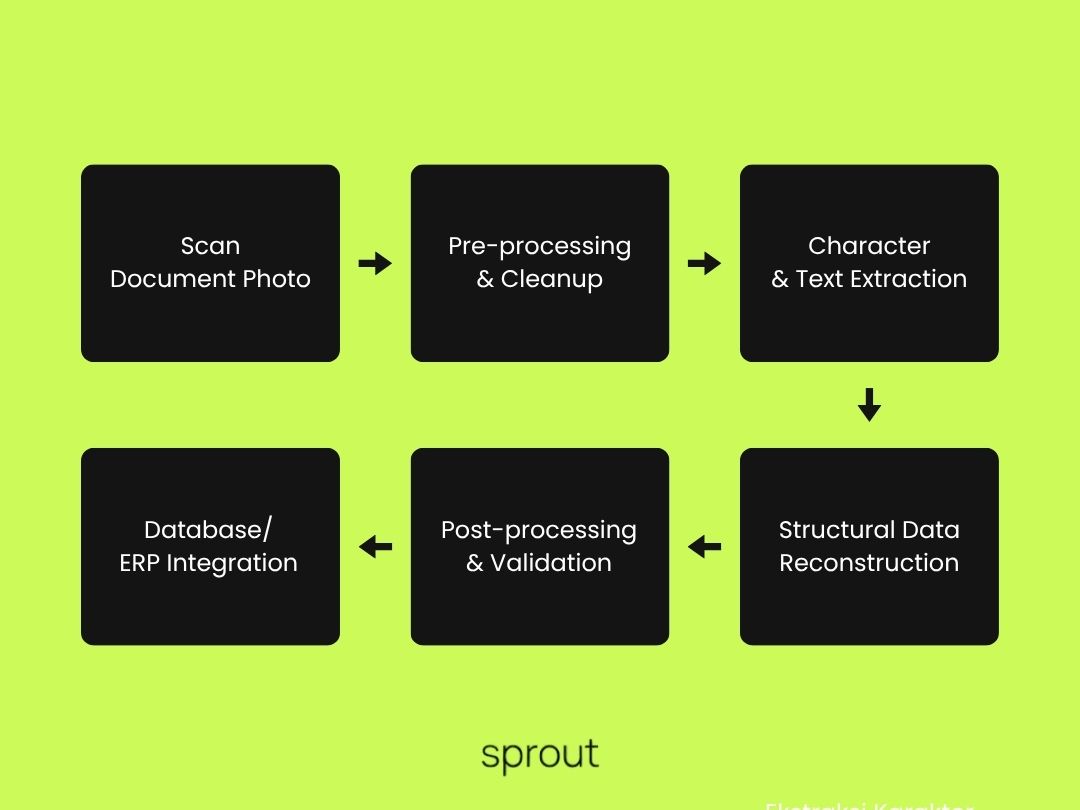
1. Image Acquisition
Physical documents are captured using flatbed scanners or mobile camera applications, outputting digital image files in JPG, PNG, or PDF formats.
2. Pre-processing
The image is cleaned to remove visual noise. Tasks include adjusting brightness, enhancing text contrast, cropping edges, and correcting document skew so text lines align horizontally.
3. Feature Extraction & Text Recognition
The software inspects line shapes, curves, and pixel patterns to identify individual letters and digits. The system compares these pixel patterns against stored alphanumeric character databases.
4. Post-processing & Validation
Extracted text undergoes contextual checks against language dictionaries and custom business rules to verify word accuracy and document integrity.
Evolution of Document Tech: Traditional OCR vs AI-Powered IDP
Modern ocr technology has evolved from rigid template-based pattern matching to Intelligent Document Processing (IDP) powered by deep learning and natural language processing.
Here is a side-by-side comparison:
Feature / Characteristic | Traditional OCR | AI-Powered OCR / IDP |
Extraction Method | Rigid rule-based templates | Artificial Intelligence, NLP, & Machine Learning |
Document Formatting | Requires fixed, highly structured layouts | Handles semi-structured & unstructured documents |
Contextual Understanding | Matches raw character shapes only | Grasps word meanings and relational context |
Handwriting Recognition | Low accuracy | High accuracy via Intelligent Character Recognition (ICR) |
Template Flexibility | Must build manual templates for every layout | Automatically adapts to new document layouts |
Real-World OCR Use Cases in Enterprise Operations
Practical ocr use cases span across multiple enterprise industries:
1. Banking & Financial Services (e-KYC Processing)
Automated extraction of details from identity cards, tax documents, and bank statements during digital account opening and loan applications.
2. Finance & Accounting Automation (Invoice Ingestion)
Instantly reading invoice numbers, line item details, tax amounts, and totals from vendor PDFs directly into core accounting modules.
3. Supply Chain & Logistics
Scanning shipping waybills, bill of lading forms, and customs paper documents to expedite port clearance and warehouse dispatching.
4. Healthcare Systems
Converting paper patient intake forms and physical medical records into searchable Electronic Health Records (EHR).
5. Insurance Claims Processing
Rapid extraction of medical receipts and policy claim forms to accelerate claim verification and approval workflows.
Build Custom Document Intelligence Solutions with Sprout
Deploying large-scale document extraction systems requires a software architecture that combines speed, high accuracy, and strict enterprise data governance.
At Sprout, we design, engineer, and deploy custom Document Intelligence and Intelligent Document Processing (IDP) solutions powered by modern AI models. We help organizations integrate advanced OCR pipelines directly into their internal enterprise application infrastructure.
Ready to eliminate manual document processing and streamline your enterprise workflows? Contact the Sprout team today to schedule a document automation consultation.
FAQ (Frequently Asked Questions)
How accurate is modern OCR technology?
Traditional OCR accuracy on clean, printed documents ranges from 95% to 99%. AI-powered OCR (IDP) maintains high accuracy even on complex, unstructured, or handwritten documents.
Can OCR read handwritten text?
Yes. Modern AI-driven OCR systems equipped with Intelligent Character Recognition (ICR) can process handwritten notes and physical form inputs effectively.
Is sensitive enterprise data secure during OCR processing?
Yes. Secure OCR deployments operate within private cloud or on-premise infrastructure, featuring end-to-end encryption to protect sensitive corporate data.