
WhatsApp remains the primary messaging platform across multiple global markets, offering open rates exceeding 90%. For modern enterprises and growing brands, leveraging this channel to interact with thousands of customers simultaneously is a critical operational priority.
Implementing a whatsapp chatbot for business enables organizations to automate customer interactions around the clock, accelerate sales conversions, and reduce support team workloads significantly.
What Is a WhatsApp Chatbot for Business?
A WhatsApp chatbot for business is an automated messaging system connected to the official WhatsApp Business API that uses conversational logic or artificial intelligence to answer customer inquiries, process orders, and send notifications automatically.
Unlike the basic WhatsApp Business application designed for small shops, an enterprise chatbot built on the WhatsApp Business API scales seamlessly. It integrates directly with internal databases, CRM platforms, e-commerce engines, and custom AI agents.
A WhatsApp chatbot for business is an automated conversational solution leveraging the WhatsApp Business API and AI to manage large-scale customer communications efficiently and securely.
Standard WhatsApp Business App vs WhatsApp Business API
Before automating customer communication, it is essential to understand the structural differences between the free mobile application and the enterprise API architecture.
Here is a feature comparison:
Feature | Standard WhatsApp Business App | WhatsApp Business API + Chatbot |
Multi-Admin Capacity | Limited (Up to 4 to 10 linked devices) | Unlimited (Hundreds of live support agents) |
Automation Depth | Basic greeting & away messages | Complex conversational flows, AI Agents, & RAG |
System Integrations | None (Standalone app) | Deep integration with CRMs, ERPs, & Payment Gateways |
Official Green Tick | Not available | Eligible for official Meta Green Tick verification |
Broadcast Messaging | Restricted to saved contact lists | High-volume verified transactional notifications |
Core Features of an Enterprise WhatsApp Chatbot
Deploying an intelligent chatbot on WhatsApp delivers powerful features that optimize enterprise operations:
1. 24/7 AI-Powered Automated Responses
Instantly answer customer frequently asked questions, display dynamic product catalogs, and check order statuses regardless of business operating hours.
2. Smart Human Agent Routing
When a customer inquiry requires human intervention, the chatbot intelligently transfers the conversation history to the appropriate support representative based on inquiry type.
3. Native In-Chat Transactions
Enable customers to browse products, select payment options, and receive immediate transaction confirmations directly within the WhatsApp chat interface.
4. Automated System Notifications
Send automated payment reminders, shipping tracking updates, account verification codes, and appointment confirmations triggered directly by back-end system events.
Architectural Workflow of a WhatsApp Chatbot
The flow of messages from customer input to AI processing follows a structured system pipeline:
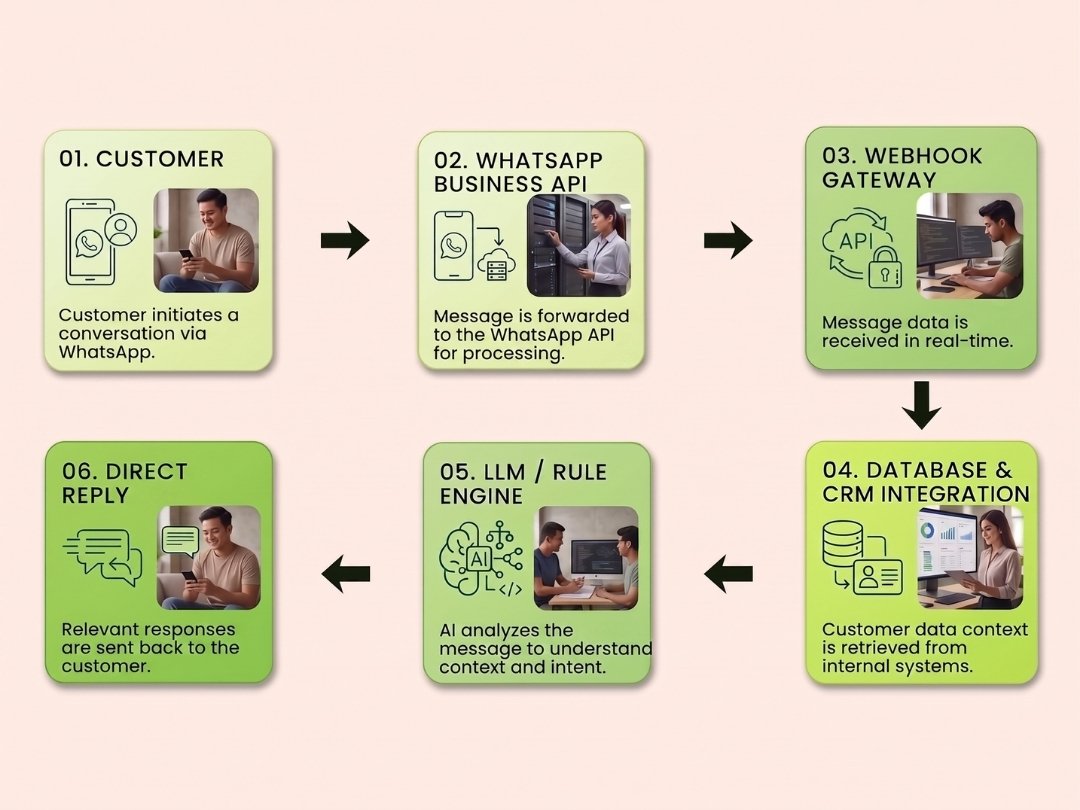
Inbound Message: The customer sends a message through their WhatsApp application.
API Event Handling: Meta forwards the message payload via webhooks to your enterprise application server.
Logic & AI Processing: The system interprets customer intent, retrieves contextual data from CRMs or vector databases, and formulates a response.
Outbound Dispatch: The chatbot formats and transmits the response back through the API to the user in milliseconds.
How to Build a WhatsApp Chatbot for Your Enterprise
Executing how to build a whatsapp chatbot at an enterprise scale requires following a systematic engineering approach:
WhatsApp Business API Onboarding: Apply for an official API account through a certified Meta Business Solution Provider (BSP) and complete Meta Business Verification.
Conversation Flow Design: Map out user interaction journeys, fallback logic, and seamless human agent handover protocols.
Database & AI Integration: Connect the messaging engine to your internal knowledge base (RAG) and CRM platform for accurate, data-backed responses.
Testing & QA: Conduct rigorous load testing, conversation accuracy evaluations, and security compliance checks.
Deployment & Analytics Monitoring: Launch the chatbot service and continuously monitor conversation analytics to optimize performance over time.
Breakdown of WhatsApp Chatbot Costs
When planning your technology budget, evaluating the whatsapp chatbot cost involves understanding three primary cost pillars:
1. Meta Conversation Charges
Meta charges a fee per 24-hour conversation window based on the message category (Marketing, Utility, Authentication, or Service). Pricing varies based on destination country and volume.
2. BSP & Infrastructure Fees
Official Business Solution Providers charge recurring platform hosting fees, server maintenance costs, or setup fees for managing API infrastructure.
3. Engineering & AI Integration Costs
Software engineering investments required to design custom conversation logic, integrate internal APIs, and deploy advanced AI models such as LLMs or RAG architectures.
Build Your Enterprise WhatsApp Chatbot with Sprout
Building a WhatsApp chatbot that goes beyond basic auto-replies to execute complex business workflows requires an experienced software engineering partner.
At Sprout, we design, build, and deploy custom Conversational AI and WhatsApp chatbot solutions integrated seamlessly into your existing enterprise software environment. Our solutions feature enterprise-grade data security, autonomous AI agents, and real-time monitoring dashboards.
Ready to elevate your customer experience and automate your sales pipeline? Contact the Sprout team today to schedule a WhatsApp AI strategy consultation.
FAQ (Frequently Asked Questions)
Can I build a WhatsApp chatbot without coding?
No-code tools exist for small business use cases. However, enterprise systems requiring deep CRM integration, custom payment flows, and strict data privacy require official WhatsApp Business API software engineering.
Will my business WhatsApp number get banned for using a chatbot?
No, as long as your organization uses the official WhatsApp Business API channel and adheres to Meta's commerce and messaging policies.
How long does it take to deploy an enterprise WhatsApp chatbot?
From API registration to full deployment of an integrated AI chatbot, the development timeline typically ranges between 3 to 6 weeks depending on back-end integration complexity.